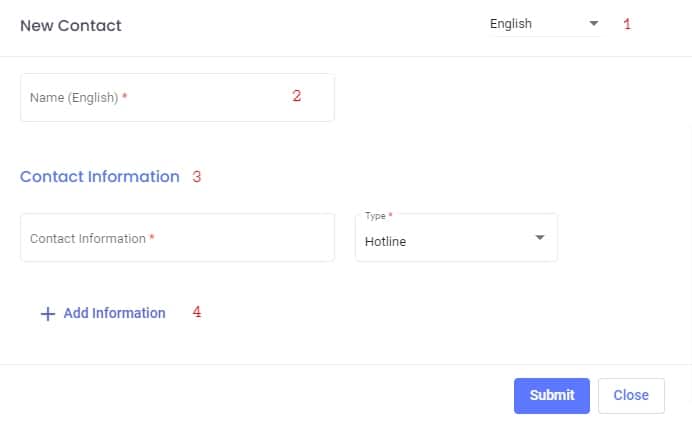
When admin user click on add new important contact in important contacts list pop up window will show up which contain :
-
- Admin user can switch between languages (English , Filipino , Urdu and Arabic) to fill the information in all languages (one language must be fill)
- Name (required) : The admin must add name based on selected language in option1
- Contact information (required) : The admin must add contact information in the text field based on the chosen option :
- Hot Line
- Phone Number (must be a UAE valid number )
- Land Line (must be a UAE valid number )
- Email (must be a valid email)
- Add information (optional) : admin can add additional information for important contact by clicking on this choice new important contact information filed will appear also can remove any information contact by clicking on X
By clicking Submit admin could save all information